Engine guides
Redis.
Browse keys by namespace, read and edit typed values, set TTLs, run commands in a guarded CLI, analyse memory, read the slow log and watch pub/sub and keyspace events.
Connecting#
Choose Redis, or paste a redis:// or rediss:// (TLS) URL. Default port 6379; ACL user (optional) and Password for authentication; DB index for the database to open first. The host can also be a unix socket, sentinel://… or cluster://…; see Redis hosts. Redis has no SQL editor, history or Safe Run; its workbench is the set of views below.
The key browser#
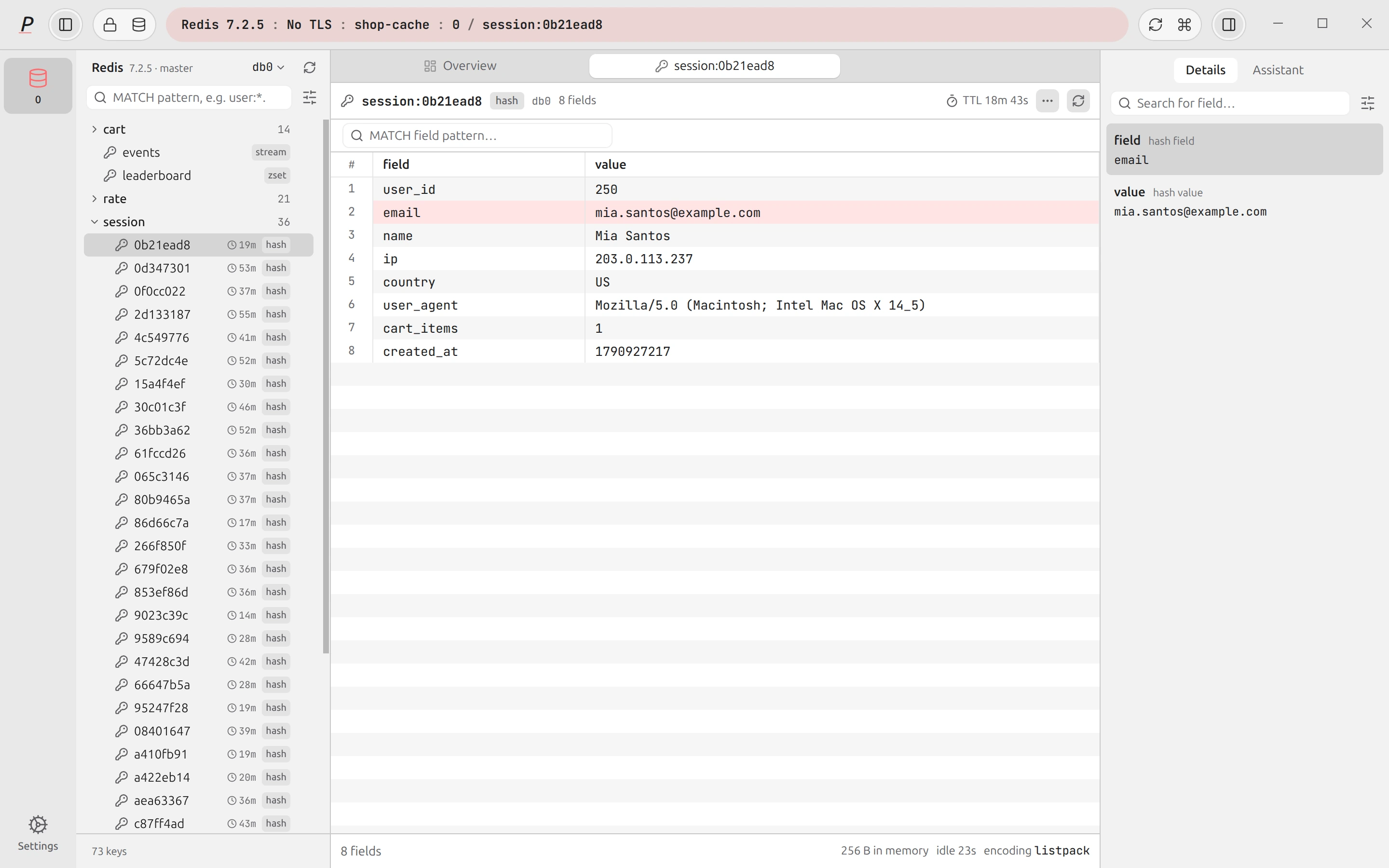
The sidebar lists keys as a tree, split on :, so user:42:profile sits under user and 42. A row shows the key type and, when it has one, a TTL badge. Keys are found with SCAN, never KEYS, so a big database does not stall the server; Load more keys (or Keep searching while a pattern or type filter is set) continues the scan. The count shown is the key count of the database you are browsing.
- Filter. The search box takes a
MATCHpattern such asuser:*. The type filter limits the scan to All types, Strings, Hashes, Lists, Sets, Sorted sets, Streams or JSON. - Databases. Click a database chip (
db0,db1…) toSELECTit; the chips show how many keys each holds. - Prefix actions (the menu on a folder): Copy pattern, Scan only this prefix, New key here…, Delete all under prefix….
- Tools menu: redis-cli, Server info, Memory analyzer, Slowlog, Pub/sub subscribe…, Keyspace events tail, New key…, Delete keys matching…, Bulk select and Rescan keyspace.
The Overview tab shows version, mode, role, memory used, clients, uptime, the number of databases, key counts and how many keys carry a TTL, plus a per-database keyspace table, with auto-refresh of off, 5 s or 30 s.
Reading and editing values#
A key opens in an editor that matches its type: string, hash, list, set, sorted set, stream or a RedisJSON document. Values that are not valid UTF-8 are shown safely, and a view switch offers Auto (pretty-prints JSON), Raw (Escaped for binary) and Hex. Collections load in pages with a pattern filter, and sorted sets and streams can be ordered either way. A string longer than 1 MiB is not fetched in full: you see a preview of the first 64 KiB marked Large value — not fetched, and it cannot be edited as text.
Streams also show their consumer groups (consumers, pending entries, last delivered ID and lag).
- Edit needs edit mode and a connection that is not read-only: Edit string, Edit JSON document, Set field (
HSET), Add member (SADD,ZADD, list pushes), per-row edit and remove buttons. Removing an element asks first. Binary or truncated values cannot be edited as text. - TTL. Edit TTL sets seconds (
EXPIRE), milliseconds (PEXPIRE) or a point in time (EXPIREAT), and removes the expiry withPERSIST. The displayed TTL counts down live. - Key actions: Copy key name, Copy value, Open redis-cli, Rename…, Duplicate…, and Delete key, which uses
UNLINKand asks first. - New key… creates a String, Hash, List, Set, Sorted set, Stream or JSON key, with an optional expiry in seconds.
Write safety#
Redis has no read-only switch, so Plasma applies one itself. Writes are available only when edit mode is on and the connection is not marked read-only; the app’s main process refuses write requests on a read-only connection even if a button were to slip through. On a connection tagged Prod, every write from the CLI asks first.
- Bulk delete. Delete keys matching… and Delete all under prefix… run
SCAN MATCHto preview first (“nothing is deleted until you confirm”), thenUNLINKin batches. On a Prod connection you must type the number of matched keys to confirm. Selecting keys with Bulk select and clicking Delete selected asks too, and reports any key that could not be deleted.
redis-cli#
The redis-cli view takes a command (GET myKey) and runs it on the connection. Use the up and down arrows for earlier commands (the last 500 are kept). Quoting follows redis-cli: double quotes with backslash escapes, single quotes, and "" for an empty argument. The classifier is conservative — anything not known to be a read is treated as a write.
| Command kind | What Plasma does |
|---|---|
| Reads | Runs. |
| Writes | Runs only with edit mode on and a writable connection; asks first on Prod. |
| Destructive or expensive (for example FLUSHALL, KEYS on a big database) | Always asks, with the reason. |
| Blocking (BLPOP and friends) | Runs on a short-lived dedicated connection with a deadline; the Cancel button unblocks it. |
| SUBSCRIBE, PSUBSCRIBE, MONITOR, and CLIENT commands that change connection state | Refused, because they would take over the connection every view shares. The message points to the Pub/sub view or the Slowlog. |
| SELECT n | Switches database, like the chips in the sidebar. |
Note that DEL and UNLINK do not expand patterns; a command that contains a glob is flagged for that reason.
Memory analyzer, slow log and server#
- Memory analyzer. Samples keys with
SCAN(optionally with aMATCHpattern; the sample cap is 1 to 50,000) and measures each withMEMORY USAGE. It reports keys scanned, total bytes, the biggest key, and breakdowns by type and by prefix. It can be stopped with Cancel analyze. - Slowlog. The server’s slow log with id, time, duration in microseconds, client and command. A reset button asks first (
SLOWLOG RESETdiscards every entry). - Server. Three tabs: Info (
INFOby section), Clients (with aCLIENT KILLbutton that asks first) and Config (CONFIG GET, with an edit button that runsCONFIG SETafter a confirmation: it changes the live configuration, notredis.conf).
Pub/sub and keyspace events#
Pub/sub subscribe… asks for a channel and subscribes with SUBSCRIBE, or with PSUBSCRIBE for a pattern. Messages stream in newest first, capped at 2,000 (a message longer than 64 KiB is cut). Filter messages accepts text, channel: or payload: prefixes and ! to exclude; Pause and Clear messages control the view. A subscription uses its own connection, so it never affects the other views.
Keyspace events tail (also in the palette as Tail keyspace events) subscribes to the database’s keyevent channels to show which keys are being written, expired or deleted. It needs the server’s notify-keyspace-events setting; if it is off, a banner offers Enable, which asks before it runs CONFIG SET notify-keyspace-events …. That changes the live configuration for every client until the server restarts and costs some CPU on busy servers. It is disabled on a read-only connection.
Health advisor#
Health in the icon rail shows read-only checks: Memory, Latency (with a note when the latency monitor is off), Slow log summary, Clients (with CLIENT KILL), and sampled Big keys and Hot keys (hot keys need an LFU eviction policy, and the view says so). Sampling uses SCAN with a MATCH pattern and a sample cap you set, can be stopped, and draws a treemap of the Top prefixes by memory in which you can click a prefix to select it.
AI on Redis#
The assistant understands Redis too. It can propose commands, and when you allow row data for the connection it can run a read-only allow-list of commands (such as GET, HGETALL, LRANGE, SCAN) to look at values. See AI assistant for what is sent.